Macro as Binary
Understand how macros are handled as binary artifacts
This technique was inspired by the approach mentioned in this blog post.
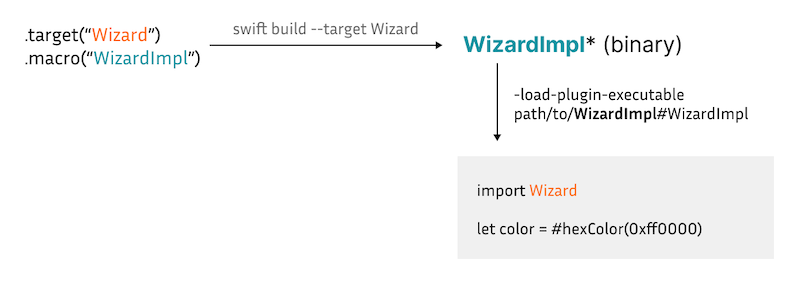
Consider the following usage where #hexColor is the macro and Wizard is its module.
import Wizard

let color = #hexColor(0xff0000)
Such a macro consists of two targets:
- A macro target containing the implementation:
.macro(WizardImpl) - A regular target containing the interfaces/declarations
.target(Wizard). This target depends on the macro implementation target.
.target(Wizard) -> .macro(WizardImpl)Here, we need prebuilt artifacts of both Wizard and WizardImpl.
Building Wizard is just like building any other regular target. Meanwhile, obtaining the tool binary from WizardImpl is a bit tricky. Building WizardImpl itself does not produce the tool binary, only the .o files. And combining them into the tool binary is not straightforward given many intermediate dependencies in swift-syntax. Luckily, building Wizard, the associated interfaces target, does produce the tool binary at .build/arm64-apple-macosx/debug/WizardImpl-tool.
After having the tool binary, macro expansion can be done simply by specifying the Swift flags as follows: -load-plugin-executable path/to/WizardImpl#WizardImpl.