
Ensuring Bundle Module
Discover techniques to ensure proper bundle module structure
Accessing Resources in Code
If a target includes resources, Xcode creates a resource bundle, which can be accessed using Bundle.module. This resource bundle is then copied to the app bundle:
App.app
  |-- App (binary)
|-- <Pkg>_<Target>.bundleBundle.module to access resources, and not make assumptions about the exact location of the resource bundle.See: Apple Documentation
How Bundle.module is Accessible
For targets having resources, Xcode or SPM build system generates an internal code for the Bundle.module extension. More about SPM implementation for this: read here.
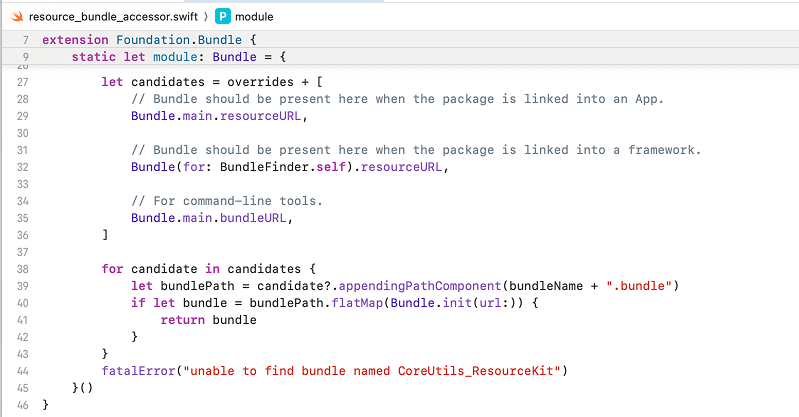
In Xcode, you can jump-to-definition on Bundle.module to see the generated code in a file called resource_bundle_accessor.swift. This file is later compiled (into an .o file) and merged into the library binary, along with other .o files.
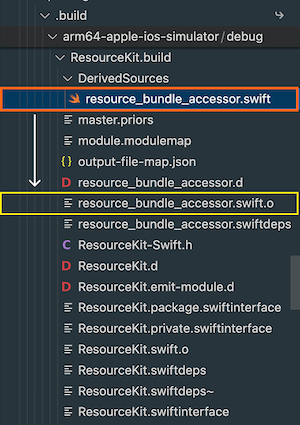
With SPM (using swift build), you should see the generated source in .build/debug/<Target>.build/DerivedSources.
Resource Bundle Inside xcframework
With xccache, we want this resource bundle to reside inside the xcframework for convenience. However, when integrating this xcframework as a binary target. The app bundle structure looks like this:
App.app
  |-- App (binary)
  |-- Frameworks
        |-- <Target>.framework
              |-- <Target> (binary)
              |-- <Pkg>_<Target>.bundle
Bundle.module can no longer detect the resource bundle. Note that the framework binary under Frameworks/<Target>.framework/<Target> is codeless. So, Bundle(for: BundleFinder.self) does not work either.
Workaround: Overriding Bundle Lookup Logic
A workaround for this problem is to override the lookup logic. Before combining .o files into the framework binary (with libtool), we overwrite the object file resource_bundle_accessor.swift.o in the build directory.
This can be done by:
- First generating the source with the additional bundle lookup:
... let candidates = [ Bundle.main.resourceURL, Bundle(for: BundleFinder.self).resourceURL, Bundle.main.bundleURL, // HERE 👇 Bundle.main.bundleURL.appendingPathComponent("Frameworks/<Target>.framework") ] ... - Compiling this file with
swiftc, for example:
swiftc -emit-library \
  -module-name <Foo> \
  -target arm64-apple-ios-simulator \
  -sdk <path/to/iPhoneSimulator.sdk> \
  -o <path/to/resource_bundle_accessor.swift.o> \
  resource_bundle_accessor.swift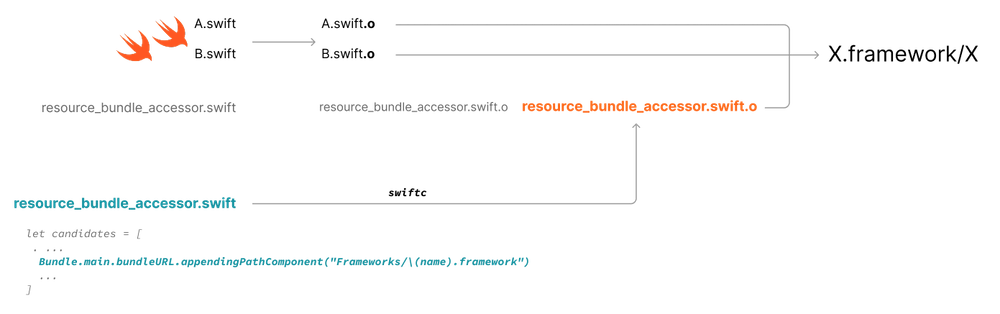
The same logic applies to Objective-C, ie. generating resource_bundle_accessor.m and compiling it into resource_bundle_accessor.m.o using clang.